
Notifications
Netronome sends notifications through Shoutrrr, a library that supports many chat and push services. You configure notifications in the web interface, in Settings, then Notifications. Notifications have no keys in config.toml.
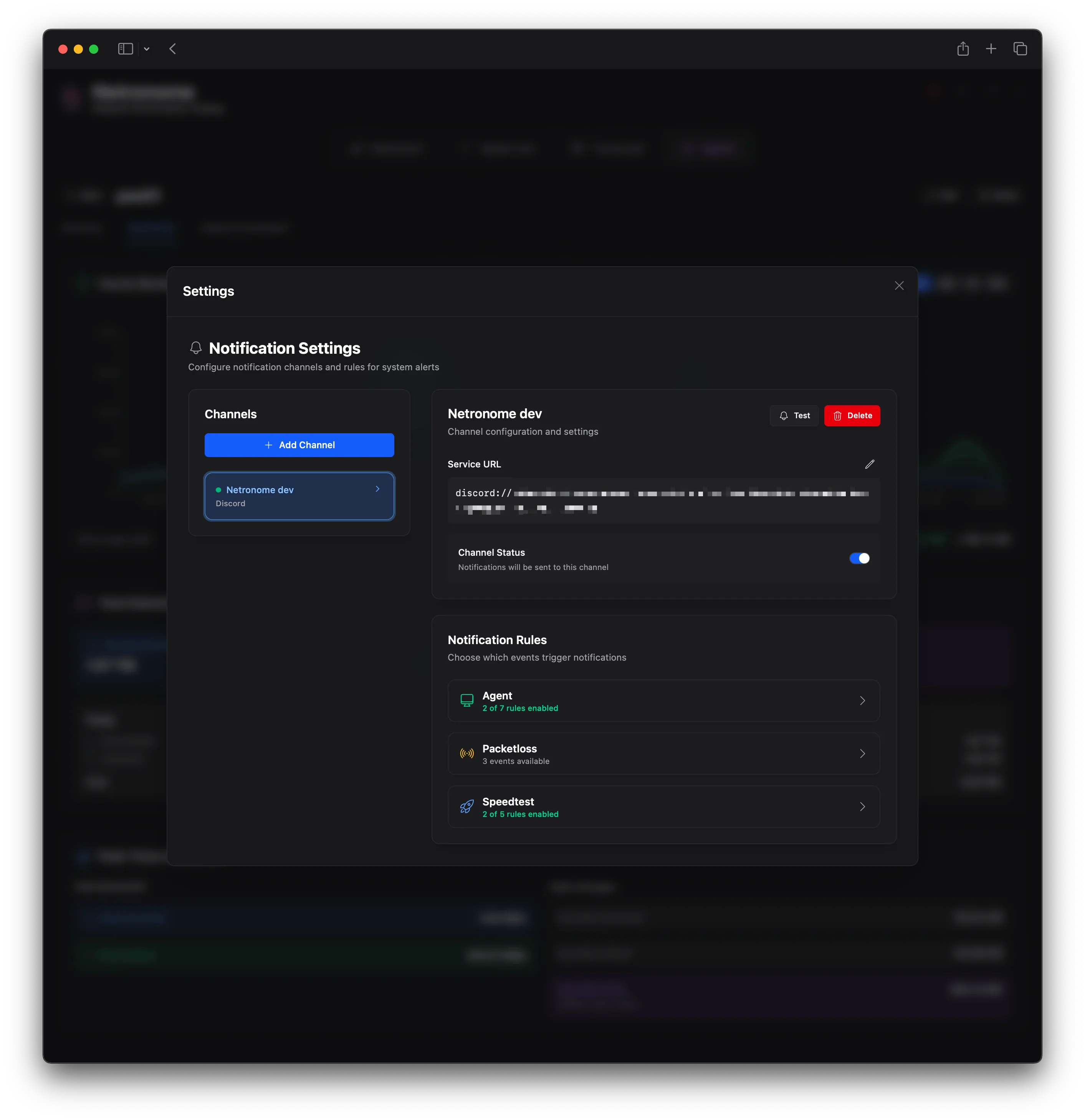
The configuration has two parts:
- A channel is one destination, with a name and a Shoutrrr URL.
- A rule connects a channel to an event. Each rule can have its own threshold.
Add a channel
Section titled “Add a channel”- Open Settings, then Notifications.
- Enter a name for the channel, for example
Discord Alerts. - Select a service. The URL field then shows an example URL for that service.
- Enter the URL of your service, then save.
- Select Test to send a test message.
Netronome refuses to save a URL that is not valid for the service. If a service does not answer in 30 seconds, the send fails.
Supported services
Section titled “Supported services”The service list in the web interface contains these services:
| Service | Example URL |
|---|---|
| Bark | bark://:DEVICE_KEY@HOSTNAME |
| Discord | discord://TOKEN@ID |
smtp://USERNAME:PASSWORD@HOST:PORT/?from=FROM&to=TO | |
| Generic Webhook | generic://HOSTNAME/PATH?template=json |
| Google Chat | googlechat://SPACE/KEY/TOKEN |
| Gotify | gotify://HOSTNAME/TOKEN |
| IFTTT | ifttt://KEY/?event=EVENT |
| Join | join://APIKEY@DEVICE/?icon=URL&title=TITLE |
| Lark | lark://HOSTNAME/TOKEN?secret=SECRET |
| Matrix | matrix://USERNAME:PASSWORD@HOSTNAME:PORT/ROOM |
| Mattermost | mattermost://HOSTNAME/TOKEN |
| Microsoft Teams | teams://?host=POWER_AUTOMATE_WORKFLOW_URL |
| MQTT | mqtt://HOSTNAME:1883/TOPIC |
| Notifiarr | notifiarr://APIKEY?channel=CHANNEL_ID |
| ntfy | ntfy://[USER:PASS@]HOSTNAME/topic[?scheme=http] |
| OpsGenie | opsgenie://api.opsgenie.com/APIKEY |
| PagerDuty | pagerduty://events.pagerduty.com/INTEGRATION_KEY |
| Pushbullet | pushbullet://APIKEY |
| Pushover | pushover://shoutrrr:API_TOKEN@USER_KEY |
| Rocket.Chat | rocketchat://HOSTNAME/TOKEN_A/TOKEN_B |
| Signal | signal://HOSTNAME:PORT/SOURCE_PHONE/RECIPIENT |
| Slack | slack://xoxb:BOT_TOKEN@CHANNEL |
| Telegram | telegram://TOKEN@telegram?chats=CHAT_ID |
| Twilio (SMS) | twilio://ACCOUNT_SID:AUTH_TOKEN@FROM_NUMBER/TO_NUMBER |
| WeCom | wecom://WEBHOOK_KEY |
| Zulip | zulip://BOTMAIL:BOTKEY@DOMAIN?stream=STREAM&topic=TOPIC |
For all URL parameters of a service, see the Shoutrrr service documentation.
- Slack: the token prefix selects the API. Use
xoxb:for a bot token andhook:for a webhook. - Pushover: the API token goes in the password part of the URL.
Microsoft Teams
Section titled “Microsoft Teams”Microsoft retired the old webhook.office.com connectors. A teams:// channel works only with a Power Automate workflow webhook: teams://?host=<workflow URL>.
Netronome sends ntfy notifications itself. It reads the same URL format and the same query parameters as the Shoutrrr ntfy service:
scheme(defaulthttps):httpsorhttp. Use?scheme=httpfor a server without TLS.disabletls:yessends over HTTP.priority: Message priority, from 1 (minimum) to 5 (maximum).tags: Tags, with commas between them.actions: Action buttons, with;between them.click: The web address to open when you click the notification.attach,filename: The URL and the file name of an attachment.delay(alsoatorin): A time or a duration for later delivery.email: An email address that also gets the notification.icon: The URL of the notification icon.cache,firebase:noturns off the ntfy cache or Firebase delivery.
The URL must contain a host and a topic. Netronome writes a warning to the log for a parameter that it cannot read, and ignores it. The channel continues to work.
Netronome sets the title of each notification, for example Netronome: Speedtest. The title replaces a title parameter in the URL.
Events
Section titled “Events”Each event belongs to a category. An event with a unit supports a threshold.
| Category | Event | Unit |
|---|---|---|
| Speed test | Speed Test Complete | |
| Speed test | Speed Test Failed | |
| Speed test | High Ping | ms |
| Speed test | Low Download Speed | Mbps |
| Speed test | Low Upload Speed | Mbps |
| Packet loss | High Packet Loss | % |
| Packet loss | Monitor Unreachable | |
| Packet loss | Monitor Recovered | |
| DNS | DNS Monitor Down | |
| DNS | DNS Monitor Recovered | |
| Agent | Agent Offline | |
| Agent | Agent Online | |
| Agent | High Bandwidth Usage | Mbps |
| Agent | Low Disk Space | % |
| Agent | High CPU Usage | % |
| Agent | High Memory Usage | % |
| Agent | High Temperature | °C |
Notes on some events:
- Speed Test Failed: Netronome sends this event only for a test that you start in the web interface.
- Low Disk Space: the value is the used space, in percent, of the fullest disk on the agent.
- High Bandwidth Usage: the value is the sum of the receive and send rates of the agent.
- Agent events with a threshold: Netronome sends at most one notification for each metric of each agent in one hour.
Thresholds
Section titled “Thresholds”A rule for an event with a unit has an operator and a value. The operators are Greater than, Less than, Equal to, Greater or equal, and Less or equal. The default operator is Greater than.
Netronome sends the notification only when the measured value matches the rule. For example, a High Ping rule with Greater than 50 sends a notification when the ping is more than 50 ms. For Low Download Speed, use Less than.
If a rule has no threshold value, Netronome sends the event each time that it occurs.